Management Reporting
Packed with helpful graphics and customized to meet your organization’s needs.
Good ergonomics reporting should be easy to interpret. MyErgoPro supports reports that combine clear visuals, useful notes, and organization-specific context so decision-makers can act on what they see.
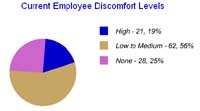
What helpful graphics should do
Show the pattern quickly
Leaders should be able to understand the core issue at a glance without reading a dense block of technical notes.
Support the story
Visuals should point back to real program findings, not distract from them.
Fit your organization
Reports are most useful when they reflect your workflow, your terminology, and the level of detail your stakeholders actually need.
Customization should make action easier
Whether you are preparing a case review, an executive update, or a recurring program summary, the goal is the same: make the next decision easier. MyErgoPro reporting can be tuned toward employee support, group-level trends, or implementation follow-up instead of forcing every audience through the same report layout.
Use visuals alongside plain-language notes
The strongest reports pair graphics with short written interpretation, practical recommendations, and a clear summary of what needs attention next. That keeps the report useful for both specialists and non-specialists.
Keep exploring
Visit Writing reports and tracking your people… for the documentation layer and Statistics and training for the trend-analysis side of the program.