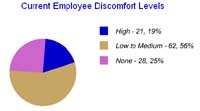
Assessment summary showing where employees report discomfort during an ergonomics review.

How to Build an Ergonomics Reports & Tracking Workflow (From Assessments to Action)

Blog

How to Build an Ergonomics Reports & Tracking Workflow (From Assessments to Action)

Most ergonomics programs do not fail because people lack concern. They fail because the evidence is scattered, the follow-up is vague, and the reporting cadence is whatever survives the week. A workable system is simpler than that. Start with one intake path, track what changed, measure whether it helped, and keep the data tied to the same case instead of smearing it across email, spreadsheets, and memory.

This article maps that workflow to the core MyErgoPro pages: Reports & Tracking, Writing reports and tracking your people…, Statistics and training, Online Assessment, and Product Database. If you need the short version, here it is: check the boring thing first. Make sure your program records the symptom, the intervention, the follow-up date, and the outcome in one place.

Chart showing current employee discomfort levels in an ergonomics program.
A useful hero image for this topic is a simple discomfort-trend chart. It shows what matters: patterns you can act on, not decorative nonsense.

Welcome to the actual goal

The goal is not to produce a heroic report once a quarter and then forget why it exists. The goal is to help employees earlier, give coordinators a clean record, and let leadership see whether the program is reducing repeat discomfort, training gaps, and workstation problems. That is the same logic behind Our Service, the visitor-facing overview on the Home page, and the case for being proactive with ergonomics.

Rule out the false lead that more dashboards automatically means more control. Usually it means more places for the same case to go stale. A solid workflow has four plain requirements:

  • One assessment or intake source for the initial symptom record.
  • One case record where notes, recommendations, and follow-up live together.
  • One reporting cadence that tells you what is open, overdue, repeated, or improving.
  • One participation log that shows who completed assessments, training, or check-ins.

Reports & Tracking workflow

The clean workflow is linear even if real life is messy:

  1. Employee completes an Online Assessment or is entered into the process by a coordinator.
  2. The reported symptom, workstation issue, and likely contributing tasks are logged to a case record.
  3. An intervention is assigned: training, workstation change, equipment recommendation, or a more detailed review.
  4. A follow-up date is scheduled before anyone forgets the case exists.
  5. The result is recorded as improved, unchanged, escalated, or pending.
  6. Those case outcomes roll into Reports & Tracking so you can see workload and trends across teams.

If that feels obvious, good. Obvious is underrated. Systems usually break when people skip step four and then pretend step six still means anything.

Hands typing on a keyboard during a workstation assessment.
Supporting image: a workstation assessment visual fits the intake and review stage better than a generic office stock photo.

Writing reports and tracking your people

This is where weak programs start performing competence instead of doing it. A useful report is not a diary entry and not a legal thriller. It is a decision tool. The page Writing reports and tracking your people… already points in the right direction: keep the whole story in one place.

What every case record should include

  • Employee name or ID, department, and assessment date.
  • Main discomfort area, task triggers, and reported severity.
  • Observed workstation issues or behavior notes.
  • Recommended actions, owner, and target completion date.
  • Follow-up date and outcome status.

What to rule out

  • Notes stored only in email.
  • Equipment changes with no result recorded.
  • Cases marked complete because the chair arrived, not because the symptom changed.
  • Reports that count activity but not outcome.
Field Why it matters Bad shortcut to avoid
Intervention owner Prevents the case from drifting into nobody’s problem “Team will review”
Follow-up date Lets you measure whether the intervention changed anything “Follow up as needed”
Outcome status Feeds reporting and trend analysis “Closed” with no result detail

Statistics and training: what to measure

The page Statistics and training gets the premise right: trend data should tell you what to do next. If your metrics do not change a training plan, escalation path, or equipment decision, they are decorative accounting.

Case metrics

Open cases, overdue follow-ups, average time to first response, repeat issues by employee group, and interventions that keep reappearing.

Training metrics

Completion rates, stretch-reminder participation, topic-level completion by department, and symptom trends before and after training.

Program health metrics

Assessment participation, manager response time, product recommendation fulfillment, and unresolved cases older than your stated service target.

What not to measure? Everything. That is how people end up with an expensive dashboard and no clue which team needs help. Start with the metrics tied to action: what is open, what is late, what is repeated, what improved, and what training clearly did not land.

Training screen explaining early signs of musculoskeletal symptoms.
Supporting image: use a training or reminder visual when discussing completion tracking and employee follow-through.

Efficiently get your people involved

Participation is not a motivational poster problem. It is a documentation problem. The page Efficiently get your people involved is the right reminder: employee involvement works when the process is easy to enter, easy to complete, and visibly connected to action.

Track participation with the same discipline you use for case notes:

  • Assessment invite sent date.
  • Assessment completed date.
  • Training assigned and training completed date.
  • Stretch reminder enrollment or follow-up prompt status.
  • Escalation requested, accepted, or declined.

If a participation report only says “invited,” it tells you almost nothing. The actual problem is the gap between invite, completion, and documented action. That gap is where programs quietly rot.

Tie-in to Online Assessment and Product Database

The data flow should be boring enough to survive staff turnover. That is a compliment.

Online Assessment feeds the case

Use the assessment to capture symptoms, tasks, and self-reported workstation concerns early. That becomes the first record, not a disposable form.

Product Database feeds the intervention

Use product records to connect recommendations with real equipment options, so your case file shows not just what was suggested, but what could actually be purchased or deployed.

Support feeds consistency

Use support when teams need help tightening report fields, follow-up rules, or training assignment logic instead of building another spreadsheet nobody trusts.

Our Service feeds ownership

Keep the workflow tied to a defined service model so coordinators know who reviews cases, who approves interventions, and who closes the loop.

Three mini examples so this does not stay theoretical

Monthly reporting cadence

On the first business day of the month, export open cases, overdue follow-ups, top discomfort categories, and training completion by department. Review it with HR or safety in 20 minutes. Do not bring 47 metrics. Bring the ones that force a next step.

Documenting an intervention

An employee reports wrist discomfort, receives keyboard tray adjustments and a mouse change, and gets a two-week follow-up date. The case stays open until the follow-up records whether discomfort improved. Equipment delivered is not the same as problem solved.

Tracking stretches or training

A team with rising shoulder complaints is assigned a short setup refresher and stretch reminder sequence. Track who completed it, then compare the next reporting cycle with the previous one. If nothing changes, rule out the false lead that completion alone equals effectiveness.

The short version

Symptoms do not organize themselves. Case notes do not stay accurate by accident. Training does not prove anything unless you connect it to outcomes. A practical ergonomics workflow is just disciplined plumbing: intake, case record, intervention, follow-up, reporting, repeat.

If you want the first diagnostic step, start with the Online Assessment and check whether every completed assessment can be traced to a follow-up date and an outcome. If not, that is the actual problem. If your program also needs cleaner equipment handoff, use the Product Database to tie recommendations to real implementation options.

When assessment data, recommendations, and follow-up tasks need to become a managed workflow, Flatlogic's AI consulting services are a useful reference for deciding what to automate and what to keep under expert review.